going54
Registered
-
Joined
-
Last visited
Everything posted by going54
-
-
No that cant happen. To hack in to a computer u have to know the IP address of the computer. without that u cannot hack in to it. and Xfire,MSN,Yahoo,Aim,AOL dont give out ppls IP address. As Sam.Gen said there have to misleading links which can allow adware/spyware to get in to ur computer and from there on they send the information back to the creator abt the comp..
-
its a hoax...there is no way that a username can give u a virus...and the best thing to do is not to accept ppl u dont know...
-
-
hey Tfen!! i remember u in FA!! nice to hear from ya.. FA for EVER!!!!!!!!!!
-
nice stuff..now thats what i call art...
-
wow me likes...me wants..
-
Hey mac...i solved my HL2 problem!! all i had to do was type steam:\\validate220\ in my address bar and it started to validate HL2 and now its updating and all...as for the worms...i went to trendmicro.com and did a complete scan..and it removed all of them. Thanks for all ur help. BTW whats the CS:S server ip??
-
any help mac??
-
Yeah good luck...even i was scared the first time and she did say no to me but its ok...once u have done it ur not scared anymore to ask another one...so go ahead and do it...we'll see that happens..
-
mac the site u mentioned is for individual file scanning.. the full scan is at http://www.kaspersky.com/virusscanner i did the scan and didnt know that my comp was infected...the other day i scaned and nothing showed up.. here is the log made by the scanner...it found 12 viruses and 15 infected files.. ------------------------------------------------------------------------------- KASPERSKY ON-LINE SCANNER REPORT Saturday, January 14, 2006 18:33:16 Operating System: Microsoft Windows XP Home Edition, Service Pack 2 (Build 2600) Kaspersky On-line Scanner version: 5.0.67.0 Kaspersky Anti-Virus database last update: 14/01/2006 Kaspersky Anti-Virus database records: 161318 ------------------------------------------------------------------------------- Scan Settings: Scan using the following antivirus database: standard Scan Archives: true Scan Mail Bases: true Scan Target - Critical Areas: C:\WINDOWS C:\DOCUME~1\Malhotra\LOCALS~1\Temp\ Scan Statistics: Total number of scanned objects: 16149 Number of viruses found: 12 Number of infected objects: 15 Number of suspicious objects: 0 Duration of the scan process: 770 sec Infected Object Name - Virus Name C:\WINDOWS\simcss\4b_1,0,0,4_simcss.dll Infected: Trojan-Downloader.Win32.Wintrim.az C:\WINDOWS\system32\config\systemprofile\Local Settings\Temporary Internet Files\Content.IE5\01YZ8PAZ\tool[1].htm Infected: Trojan-Downloader.JS.IstBar.x C:\WINDOWS\system32\config\systemprofile\Local Settings\Temporary Internet Files\Content.IE5\344YQ9O0\hot[1].htm Infected: Trojan-Clicker.JS.Linker.j C:\WINDOWS\system32\config\systemprofile\Local Settings\Temporary Internet Files\Content.IE5\G5Y3CH6B\bridge[1].cab/bridge.dll Infected: Trojan-Spy.Win32.Briss.g C:\WINDOWS\system32\config\systemprofile\Local Settings\Temporary Internet Files\Content.IE5\G5Y3CH6B\bridge[1].cab/jao.dll Infected: Trojan-Spy.Win32.Briss.g C:\WINDOWS\system32\config\systemprofile\Local Settings\Temporary Internet Files\Content.IE5\G5Y3CH6B\bridge[1].cab Infected: Trojan-Spy.Win32.Briss.g C:\WINDOWS\system32\config\systemprofile\Local Settings\Temporary Internet Files\Content.IE5\Y52FGJOR\CA14G7PP.htm Infected: Trojan-Downloader.JS.FlingStone C:\WINDOWS\system32\config\systemprofile\Local Settings\Temporary Internet Files\Content.IE5\Y52FGJOR\prompt[1].htm Infected: Exploit.HTML.CodeBaseExec C:\WINDOWS\system32\o Infected: Trojan-Downloader.BAT.Ftp.c C:\WINDOWS\system32\TFTP1812 Infected: Backdoor.Win32.Rbot.15 C:\WINDOWS\system32\TFTP3592 Infected: Backdoor.Win32.Rbot.15 C:\WINDOWS\system32\win32apisrvr.exe Infected: Backdoor.Win32.Rbot.gen C:\WINDOWS\Temp\djalfghq.htm Infected: Trojan.JS.Pooter.b C:\WINDOWS\temp.bat Infected: Trojan.BAT.Zapchast C:\WINDOWS\xsxfc.exe Infected: Trojan-Downloader.Win32.IstBar.ij Scan process completed. ----------------------------------------------------------------------- now i did another scan with my AVG scanner but it only found a couple of them..how do i get rid of them? and will this possibly help in the HL2 problem??
-
Congrats!!!
-
in the website u mentioned u have to select a file to scan...which file do i select??
-
Yes i have defraged my HDD No will checkdisc now.. I have 13.6GB space left Currently i have 31 processes running yes i am using antivirus AVG...
-
i did PM Kol Klink but he told me that he doesnt know anything abt that sort of problem....
-
I uninstalled every thing..every HL game and mods..uninstalled steam and deleted the folders...and cleaned the registry and when installed HL2 u have to install steam first before installing HL2...i only have one HDD no partitions... when installing the game it calculates how much disk space is reqd...so when i click on the HL2 checkbox it says 13KB and when i click on CS:S its says 1268MB....now what does this mean??? i dont think that HL2 gets installed because its only asking for 13KB of space....no idea....
-
mac i tried this....but it didnt work....
-
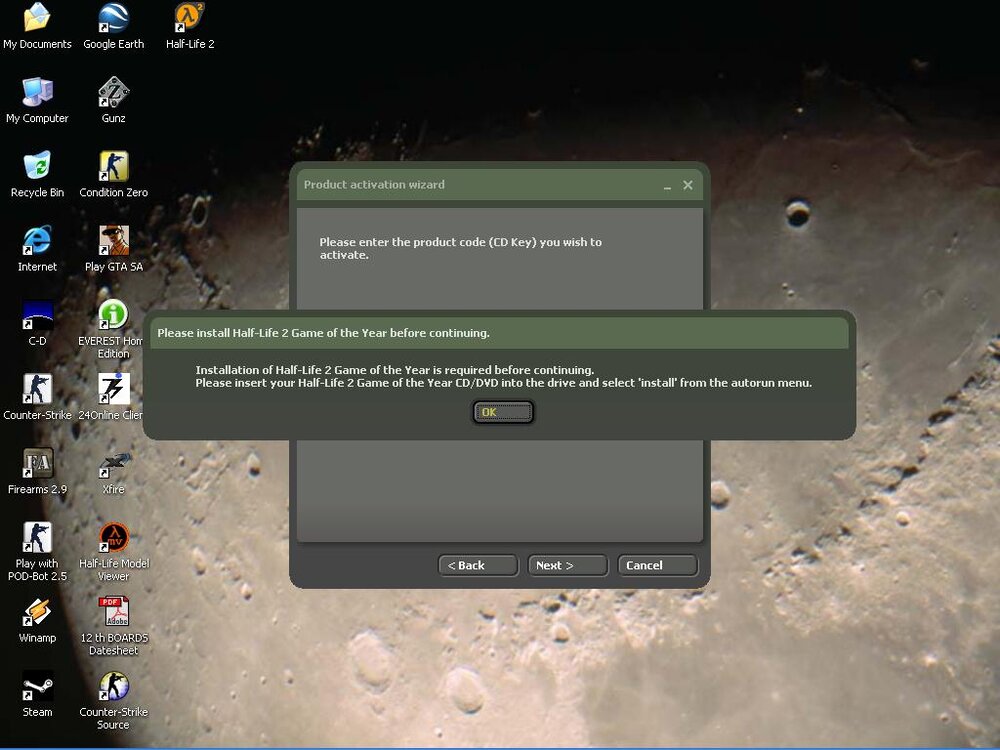
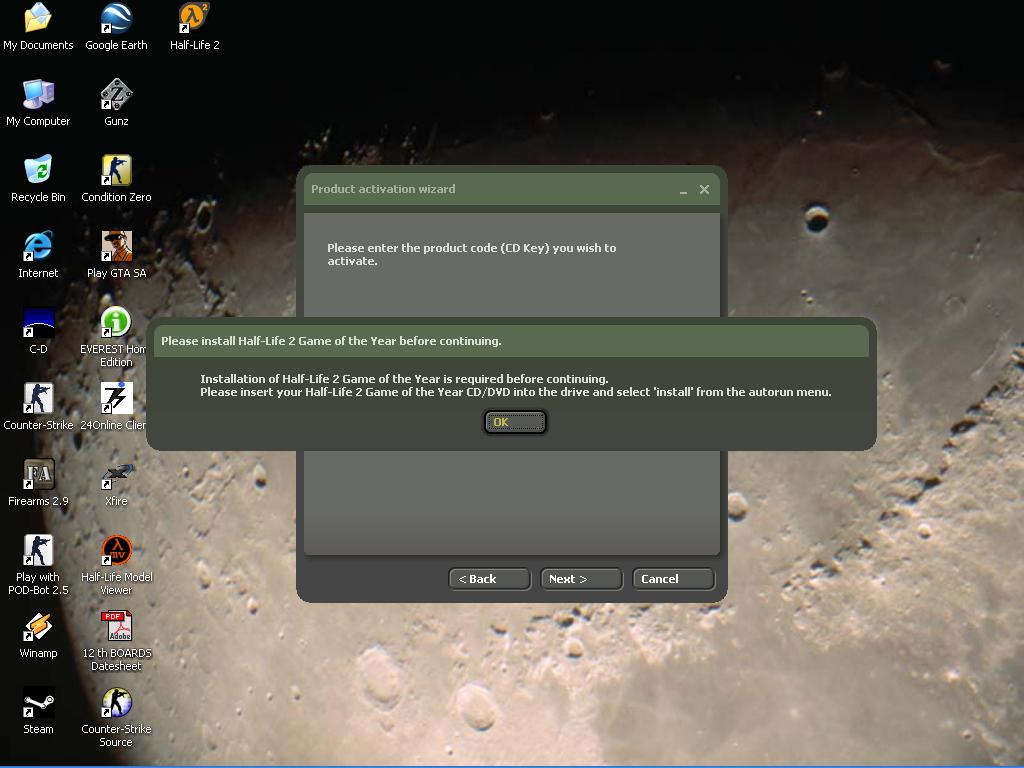
Yeah but when i try to activate the game it says that u need to have the game installed before activating it...the same msg as the screenshot
-
Ok....so ur saying that if i use the installer ur using i can install and play those games without installing them from the CD? ok...thats cool....where can i get it?
-
Ok...thanks mac i'll try that too and see if it works... Hmmm yeah im in Mumbai,India..how much will the ticket be from ur place to here? lets see if i have that much to buy u a ticket....
-
Thats what i got..Its an orignal HL2 Game of the year pack..on the box itself it says that this pack includes 5 CDs and with HL2 there is CS:S,HL:S,HL2:deathmatch.....thats all what it says on the box..other than that i have no idea... Col Hogan i'll try that and tell u the result......
-
i did this....but still the same thing again....i got 5 CDs with this pack.....only 2 are used for installation of the game....no idea abt the other 3.....when installing the game it calculates how much disk space is reqd...so when i click on the HL2 checkbox it says 8KB and when i click on CS:S its says 1268MB....now what does this mean???
-
ok but then i will have to install all my other games again as well....hmm ill try to do this...keep a back up of the steam folder....thn delete the orignal one...and install it...see if it works........
-
one thing that i have noticed is that in the steam dir there is no folder from HL2...even though the installation dir is C:\Program Files\Steam....
-
Hey guys!! my g/f bought me HL2. So now i installed it..after installing it steam automatically starts up...then the product activation box pops up...in which i enter the CD key..and after that a box pops up saying that Installation of Half Life 2 Game Of the year Edition is required before continueing and another message comes with it...now what do i do?? i installed the game over and over gain and its not working...what do i do??? Plz need help!!! /monthly_06_2011/post-62-130810179585_thumb.jpg