
WhiteNine
Moderator
-
Joined
-
Last visited
Everything posted by WhiteNine
-
i'll be there... its going to be shipped to my door via pre order.
-
-
it would be nice if the guns would take longer to over heat, but it basically forces you to fire short accurate bursts. once you get the hang of it you begin to naturally compensate for the walker's movement (sea sickness/beer goggles). it doenst bother me that much. but i guess all those years of "Earth Seige", "Mech Warrior", and "Armored Core" really have paied off. also just some Piloting tips to you all. fire the guns in 2 round bursts for medium to long range shots, and you can just blow ammo at close range (remember to keep an eye on you're heat gauge). Also firing missles while shooting the main cannons adds to the same heat scale i believe. so choose you're targets wisely. the mech is mainly an offencive anti-infantry vehicle, but can also function as a medium to long range defencive anti-armor vehicle. If your missles are not connecting, remember, depending on which walker you have the missles will fire from different positions (either alternating left and right, or just one side) you have to move the torso accordingly at short to medium range to hit your target. Also a top gunner is a necessity, ESPECIALLY in titan mode. i know it sucks to be the Anti-Air guy on a walker, but this game is about teamwork, not who gets the most points. besides the walkers' main guns have a limited vertical range so they cant take care of it them selves. in summary, Walker: Medium to long range Vs. vehicles, Short to meduim range against infantry. use shields only when necessary. short burst fire with main guns. only fire missles in small bursts of 2 or 3 to prevent overheating. compensate for missle pod arrangements. and check your 6 constantly. also learning to judge angles helps for walking helps (so you can steer while firing to the rear). when possible team up with another mech/tank/apc with engineers around. and last but not least, Teamwork is key. class dissmissed.
-
1. team play is rewarded. 2. vehicles are nicely done and add a new twist to things 3. levels are very nice and clean looking (i agree with gator on the titan for the large open maps, although it would be nice to toss in a city map with titan for some chaotic gameplay) 4. weapons are well done. still getting used to them but they seem sufficient. 4.a. HUGE KICK ASS REVOLVER WITH A BLOCK BARREL.... *drool* 5. Unlocks are (in the words of Peter Griffin) "Freakin Sweet"
-
#1 for me. #2 is still good, BUT as people have said it doesnt have our logo.
-
-
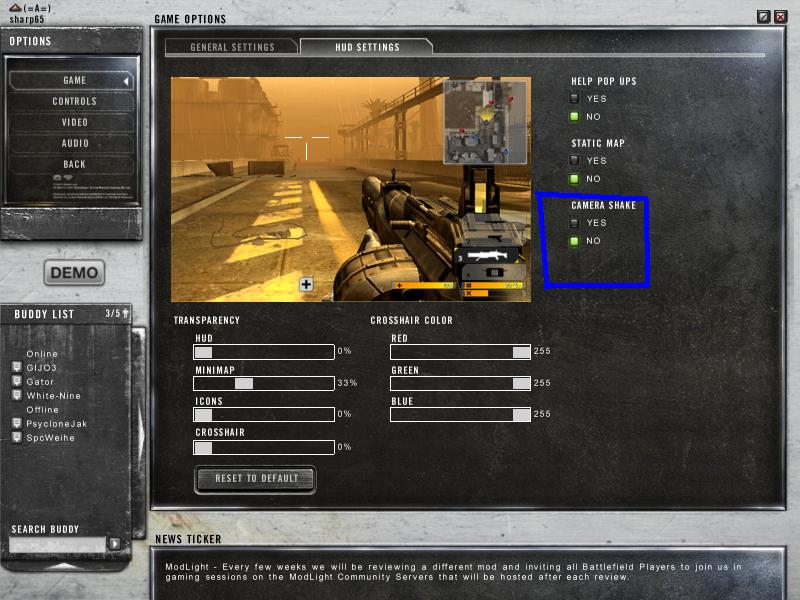
Just an Fyi for all of ya. For BF2142, if you go into your Game Options, and select the Hud Settings Tab, you will then have the option to turn off the camera shake. And Presto! no more sea-sick/beer goggle soldiers! Have fun and Enjoy! :thumbsup: See you on the Battlefield! Thanks to Sharp for the pic. /monthly_06_2011/post-1301-130810187833_thumb.jpg
-
oooooo.... Shiny!
-
-
I reccomend a Razer Pro. its a corded mouse but it's 1600 Dpi and can be found for around $35. the MX 1000 is ok but with the $65-80 pricetag you better be sure you want to spend that much to go wireless. personally i think wired is better. *EDIT* if you're lookin for a step up, go with the RAZER Copperhead Chaos RZ01-050300-R1M1 Black its a 2000 Dpi 7-button mouse with a 1ms response time. not too shabby for the $60 range.
-
agreed... lets grab the wiffle bats and have us some fun! lol
-
Wow. that is incredible!
-
personally i think it should be permitted. only because in BF2 the commander's assets are in the main about 90% of the time. if a squad wishes to assult the main as a diversion, then it seems logical. just my 2 cents
-
sigh.. people just dont get it do they? oh and nice Hellsing Avatar and sig TH:thumbsup: . I jsut picked up the series on DVD the other day!
-
Glad you enjoyed your stay Eagle. I look forward to seeing you on the battlefield.
-
did anyone else else get an error for BF2 that states "You're CD Key is not Valid" ? :thumbsup: just wondering if it was just me or if this was a normal problem with the 1.4 upgrade. i will uninstall BF2 and reinstall with the full 1.4 patch using this method: uninstall- restart- reinstall BF2- restart- reinstall BF2:SF- restart- install 1.4 patch full. I will report back with my findings to this issue.
-
Guild Wars FTW!!!
-
-
you'll have my blade watching your back... date permitting of course...
-
lol yea I guess the i posted the picture in the gallery it counted as well... thats weird...... now i'm showing 998.... grrrrrrr... well i'll make that up in a jiffy *EDIT* DONE!!!
-
Well Guys and Gals, this is officiallly my 1000th post (incase you couldnt tell:p) I've been here for a while now, and i like to say that this is truely a great place to be. Good people, Great gameplay, and above all... we all like to pick on Impact:D. what else could a person want? I hope that i'll be around for many years to come. Thanks again all! White-Nine VIVA THE ARMORY!!!!!!
-
OMG!!! this doesnt happen too often.... cherish it while it lasts! lol
-
More people wish to be defeated? As you wish... I'm in:p
-
Get your key here!!!
-
TOASTY!!!! lol :thumbsup:

