SSpeaks
Armory Member
-
Joined
-
Last visited
Everything posted by SSpeaks
-
I was unable to read my name in the vid so i maintain it did not happen....
-
sweet find Sharp. waiting is making me crazy like i want to knock over a gamestop
-
wow i thaught i was listen to a radio commercial just then:D
-
-
-
I hope not that way i have a chance:D
-
wow that is alot of info thanks Sharp
-
Welcome back and congrats
-
-
depends on your speed and ifyou have ever been to the place you are tring to load into look for me in the game yo name is lord patrick x
-
Well it is old hollows eve so it is supposed to be scare good costum:D
-
-
You know i am just learning there is no need to be a a$$
-
i get more excited every single day
-
-
is is my first attempt to create a sig on my own:D
-
that is perfect Eskimo thank you:D
-
I beleave ppl will actually be tring to kill you:D
-
i would like a cod4 sig if anyone is up for it:D
-
-
i have got him twice in the same round a few times none the less good work
-
i think i need to work harder so i can be someones nemesis......probably wont be though:)
-
i have had three beta copys for month now from my gamestop hookup disks and all
-
Just kidding you will probably knife me for just saying that LMAO. Thanks again all. To late...lol
-
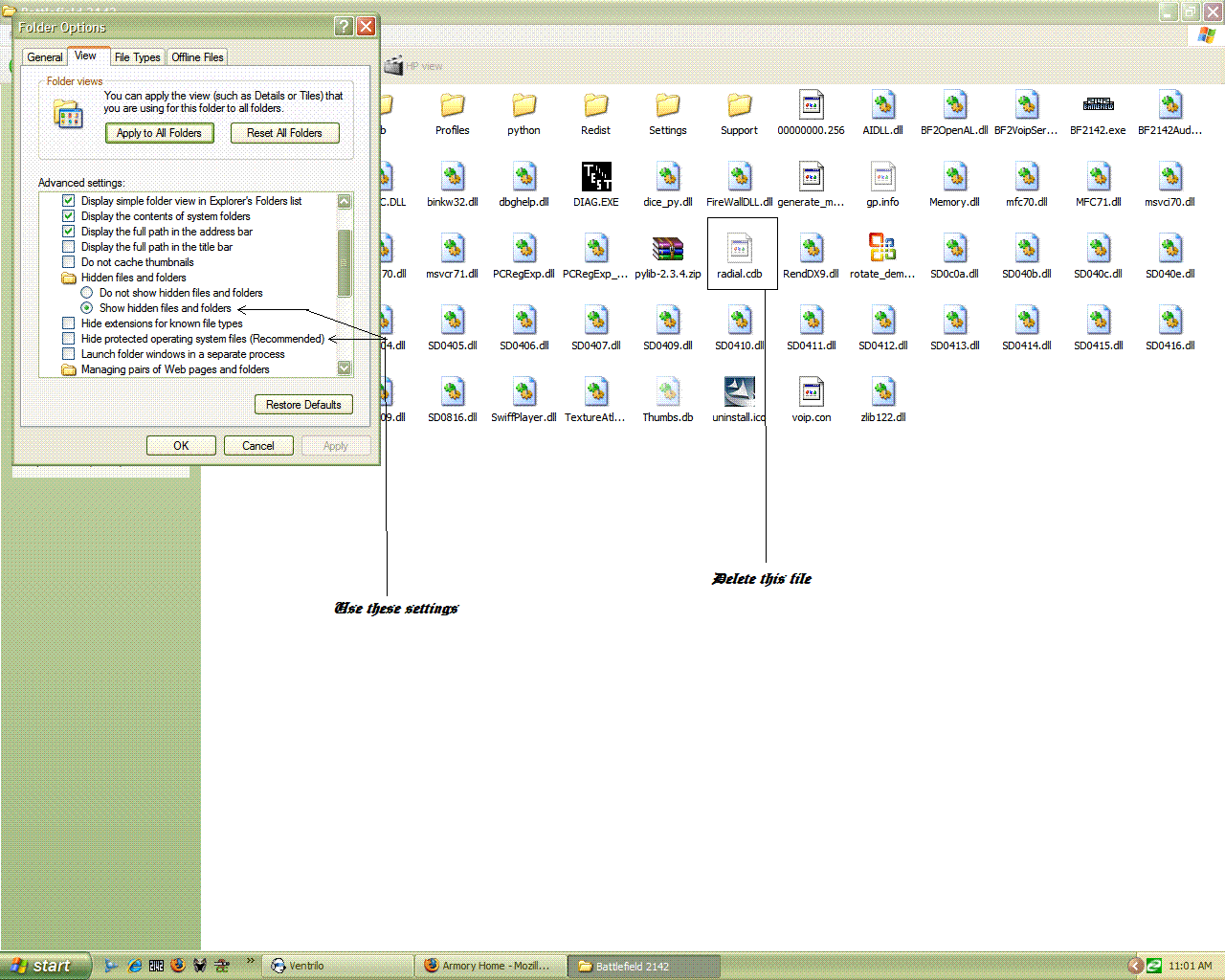
AS a lot of us have been having this problem as of late I thought that I would make a post on a fix for this problem. First you need to go to your 2142 folder the path should be: My computer> C drive( or whatever drive you install your games to)> Program files> Electronic arts> Battlefield 2142 Once there you need to click tools on the browser bar and then folder options. Click the view tab on the box that opens. Check the dot next to Show hidden files and uncheck box next to Hide operating system files (see picture below) and hit apply. Last you need to delete the Radial.cdb file (see picture below)It will create a new one next time you start the game. don't have game running while you do this or it wont let you delete the file because it is already in use. This should fix your problem in less time than it took to read this post. /monthly_06_2011/post-2121-130810222613_thumb.gif