
TigerHawk
Armory Member
-
Joined
-
Last visited
Everything posted by TigerHawk
-
To help anyone who would like to make one for you, give out some ideas you would like in the sig :peace:
-
well it's better than the seizure giving one
-
-
Congrats on the new bundle of joy that's coming your way and have fun in your new dungeon room, I mean gaming room
-
oops forgot the "s" Funny over the weekend in thunder bay we had a car show too, their were all kinds of classic cars
-
oh man nice shots, sweet classic car
-
I want to make something in memory of FA. Someone on the WaW forums made this as a background for the FA load menu in game but it only said Firearms, and I wanted it as a desktop so I took a screen shot of it after firing up FA. Then I started adding to it. I made four different kinds. Enjoy. This is just Firearms Never Forget text (I added the Never Forget part). Desktop Size Here This is with the B-Cell Models I couldn't find just the plain ones. Desktop Size Here This one has the B-Cell Models and the Medvac for the medics of FA. Desktop Size Here This one has it all including the FA Logo. Desktop Size Here Use them if you like, I just wanted to have something to remember FA and how great of a game it was and always will be.
-
You'll have to wait for flippy he would know
-
but what about the lone wolves, like me?
-
oh my bad but it looks like the falls on the Fushe Pass map
-
:o to hear things are not going good for you, maybe you can move to thunder bay and become a bus driver like Klink and Hogan then again maybe not
-
you lie klink, you thought you had all unlock weapons remember that drunk email you sent :o
-
Can I have that job next time, because I love spamming the other team with arty :o YAY it's FA all over again
-
I wish I knew what it is because when I click on the link I get this "The page cannot be displayed" :o
-
and of course i missed it all oh well work comes first
-
wow someone is really obsessed with bf2 :o but that's still a cool looking pc none the less
-
like I said in your other thread someone has way to much bf2 on the brain :o
-
HAPPY BIRTHDAY Your not the only one having a birthday today my youngest brother is turning 17 today YAY I get to use my paddle and give him 17 birthday wacks
-
When I pick him up from work and he drives by me in the parking lot he starts shooting me like he has an m79 it's pretty funny.
-
well it's empty now :arrow: couldn't resist.
-
-
ok if you say so I'll try to get in sometime, when it's not full
-
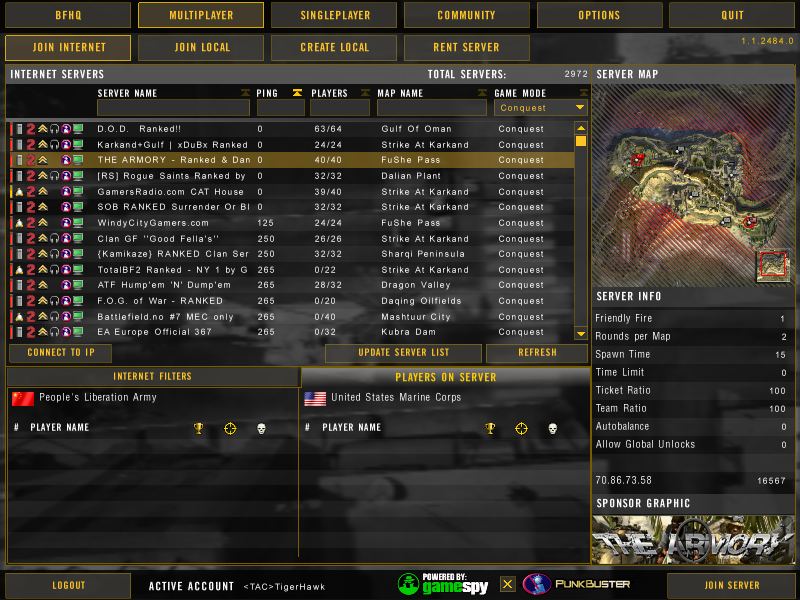
I was going to join but when I loaded the map list our new ranked server is showing a ping of 0 with 40 people in there but not showing who Does anyone else have this problem or know what I could do? Can I still join even with a ping of 0? /monthly_06_2011/post-531-130810176327_thumb.jpg
-
-
I knew that already Klink I wasn't asking for them to be fixed you goof . I wanted to know when I last played and to my surprise it's been over two weeks according to the stats because there is one player and one clan left

