sharp65
Armory Member
-
Joined
-
Last visited
Everything posted by sharp65
-
podtillery has been born.
-
-
yea..what he said. If they removed bunny-hoppping etc.. from battlfield it would honestly ruin the game. I've played mods where they have and truley they aren't even fun to play. An exploit is when you get into the palace walls and defend the flag, not doing something that was built into the game.
-
-
Nice story gator
-
wow, it won't be snowing here for a while...lol
-
I'll pick it up in the morning, shouldnt be too hard.
-
Same as bf2 basically, all of the options are on the bottom of the screen. You can right click on any point on the map and select an option, or select at the bottom first and then a point on the map.
-
-
Nice tweak guide to help your performance in the demo, another one will be made up release. [GUIDE]
-
cool
-
The point system in the beta doesn't work right, so don't go by it. I know kills are 1 point thought. I will see if I can find a more concrete list.
-
sueze canal and fall of berlin looked cool from the previews, but on the first day I say we try all of them (except the demo/beta maps) so we know if there are any that we can eliminate.
-
thats because you have no unlocks, this isn't like bf2 where you are fine using the default kits. In 2142 you cannot use what comes out of the box. It takes more effort to customize a kit that works for you. Did you play the beta? if you did you would like it better.
-
I don't know as of right now, they definitley seemed toned down from the demo. The anti-tank weapons are really that powerful as of right now, it takes a lot to do damage.
-
That wouldn't make too much sense, im sure you can have some of both. If not, then they better patch that ASAP.
-
Its definitley a more team oriented game, you get more points by really playing as a squad and pushing for objectives. Its hard to play without the unlocks because some things are so vital ie. nades, defib etc...But the default kits aren't terrible. Since there are only 4 main classes, the length of customization is very deep, no two people will probably have the exact same items. I was playing on a regular server last night without titan mode and it just doesn't seem to have fun. Maybe we can run mostly titan mode but throw some conquest in because I don't believe all maps support titan mode.
-
from the EA bf2142 forums, hope this helps
-
-
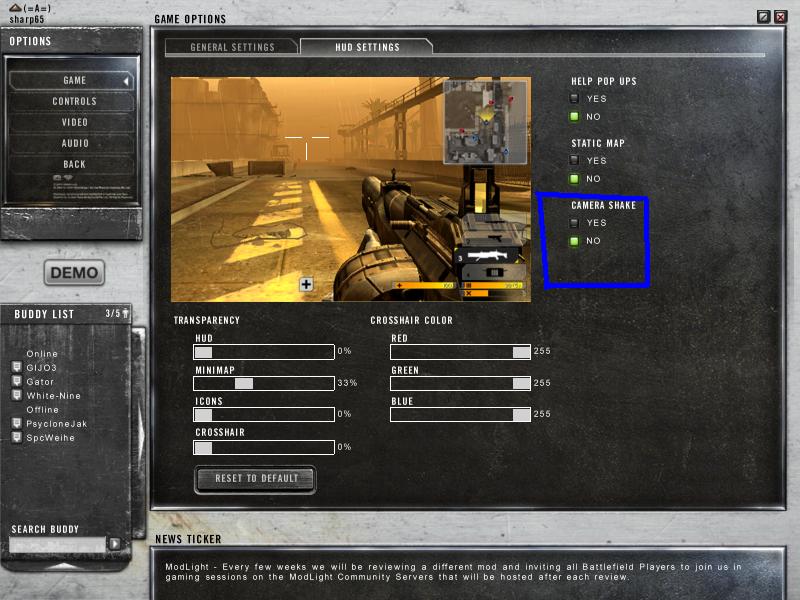
A few of us found a very helpful option that will make the game much better for you. Go to options > Game > HUD setting > change HUD shake to OFF! This will make the game more enjoyable for you. Thanks to w9 for this. See attached picture or further reference. /monthly_06_2011/post-980-130810187826_thumb.jpg
-
I have it on steam, interesting game.
-
-
thats awesome, don't even remember the demo. Don't think I played it
-
good info only thing im getting is the promotion for pre-registering my name.
-
You can go to UserCP > edit profile and put your name there so it shows up on the Battlefield drop-down menu