
WSAENOTSOCK
Armory Member
-
Joined
-
Last visited
Everything posted by WSAENOTSOCK
-
That's right. http://www.junglemistmod.com/ This is for for HL2.
-
Candy bar is 33 points + tax.
-
Early vacation for State
-
This is correct. LONG time no see, Tiger. How are you doing?
-
Good for you man
-
-
-
I posted WAY too much back in the day...
-
-
Do you guys like Canadians?
-
I'm trying to get Rush tickets in Toronto... and ZZTop tickets in London
-
Metal concerts seem to kick so much rear. I don't normally listen to metal, but every time I see a metal concert, I am amazed.
-
-
WOW. It's amazing. Simply amazing. I set up outside one of the USMC bases with an M249, and then all of the sudden, about 10 Iraqi's ran right out in front of me, with no cover, all about 75m away. Man, I had a BLAST shooting all of them down.
-
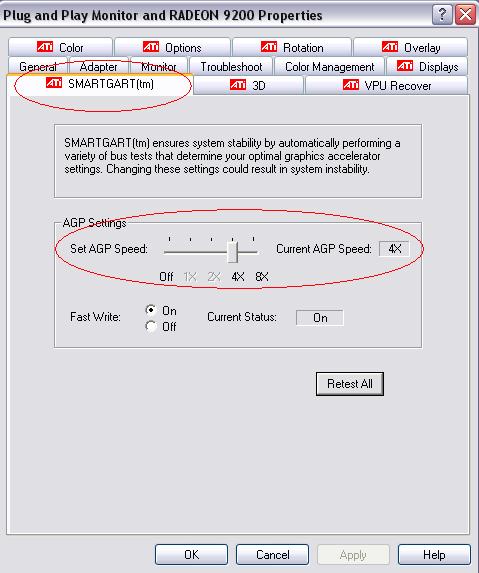
As those of you who own an ATI RADEON 9200/9250 AGP video card may have found out, there's a nasty little bug that won't let us play the Battlefield2 demo. Well, after hours of searching, I found a solution that should work for most. A reminder that this is for the AGP version of the card ONLY. PCI cards (as far as I know) still have no fix. 1. Download the latest Catalyst drivers (as of now, they are the 5.6's) 2. Install said drivers. 3. Right click on the ATi symbol on your taskbar (bottom right), go to settings, then ATi display settings. 4. Choose the top tab that says SMART GART, and set your AGP to 4x. You'll have to restart the computer. 5. Play away! /monthly_06_2011/post-19-130810173286_thumb.jpg
-
Never been to that part of Toronto before... hopefully never will have to either
-
All the vehicles in my driveway are discontinued... what's the problem with that?
-
I'd have to look over the evidence and stuff before I made my decision, and since none of that we are able to see, well, I may never know for sure.
-
Seriously, and I don't mean to be rude, but what you have to do is get off the computer, and stop playing games for awhile, hang out with some friends IN REAL LIFE, wait a few weeks, and see if you still desperately need this computer. If you have one that runs the game, that's absolutely fine. There is absolutely NO NEED for a top of the line computer. Ever. Oh, and the restocking your bank account, I see the downside, and it's really, really obvious. You take your money, and blow it on a computer, and get horribly addicted to it. You lose all thoughts of getting a job, or hanging out with your friends. You go to bed at midnight every night, and constantly sleep in class. Bottom line, you really don't need a computer that badly.
-
I just tried your suggestion, and I'm still having the same problems . I reinstalled BF2, and the 5.1 drivers. No luck. For some reason, EVERY SINGLE BF GAME DOES THIS TO ME, if I don't do one of the fixes that I find on Google. I just can't find anything on google for this yet. More help please
-
I can't get to the menu. I go through all of the stupid videos, but then it just stop running, black screen, and everything stops responding. Help!
-
That's probably becuase GameSpot or whoever got the exclusive demo, was the only one to be able to distribute, so why let your customers use a different product in your store parsay.
-
50 minutes left for me . I'm ALMOST thinking of buying a 9800 Pro if this game is really nice.
-
Can't wait.
-
Ham Chicken Turkey Salt Pepper Mayo Mustard SubSauce Pickles Mushrooms Cheese Onions Hot Peppers .