
Skip to content
View in the app

A better way to browse. Learn more.

The Armory

A full-screen app on your home screen with push notifications, badges and more.

To install this app on iOS and iPadOS
  1. Tap the Share icon in Safari
  2. Scroll the menu and tap Add to Home Screen.
  3. Tap Add in the top-right corner.
To install this app on Android
  1. Tap the 3-dot menu (⋮) in the top-right corner of the browser.
  2. Tap Add to Home screen or Install app.
  3. Confirm by tapping Install.

RiverRat

Armory Member
  • Joined

  • Last visited

Everything posted by RiverRat

  1. I'm with strobes on this one
  2. something new is allways great
  3. have you all been drinking again ??
  4. get the Girl
  5. www.stormlauncher.com Check this out looks great
  6. I have a name on mine /monthly_06_2011/post-105-130810186036_thumb.jpg

  7. with lots of fun comes lots of GAS
  8. RiverRat replied to X18's topic in Gaming
    looking good
  9. Here is one for them to shoot at 103 mph /monthly_06_2011/post-105-130810185064_thumb.jpg

  10. Happy 4th the water calls
  11. RiverRat replied to 79cutlas's topic in Gaming
    restart your computer after you buy it
  12. EA is going broke so give them your money..We may get a new patch out it
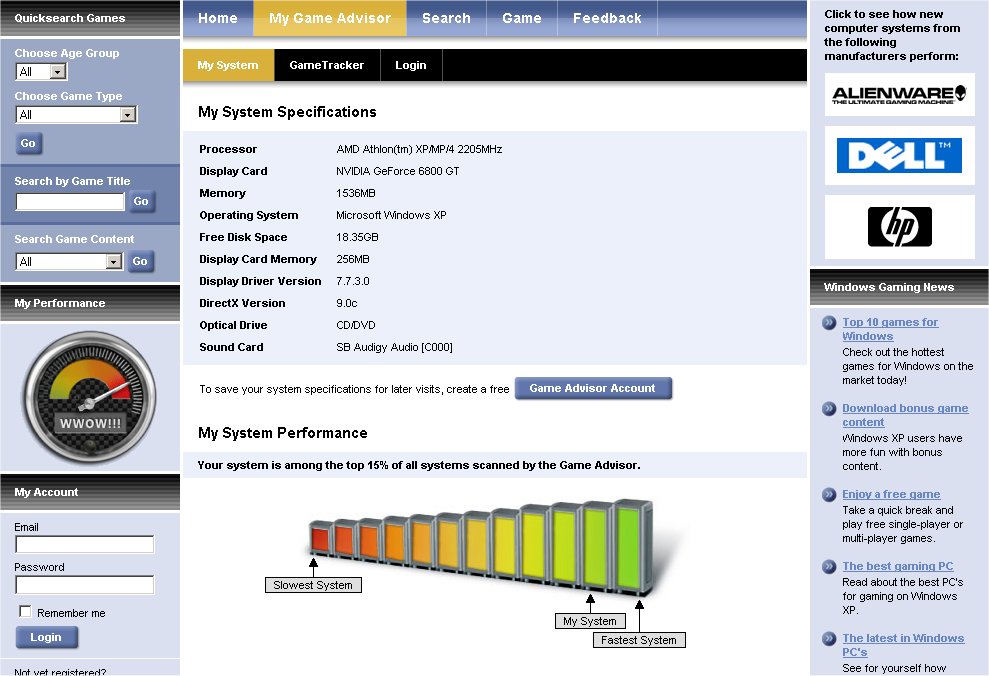
  13. I'm on the slow side /monthly_06_2011/post-105-130810183053_thumb.jpg
  14. RiverRat replied to 11bravo10's topic in Main Hall
    come on in and kick your shoes off
  15. EA wants your money
  16. so are we going to give EA 10 again or not???? who is buying it ?
  17. Glad you could make the show
  18. RiverRat posted a topic in Main Hall
    What is the best program for webcams?
  19. good one
  20. RiverRat replied to GIJOE's topic in Main Hall
    hello Joe
  21. RiverRat replied to GIJOE's topic in Main Hall
    hello Joe
  22. come on in and kick your shoes off
  23. come on in and kick your shoes off

Account

Navigation

Search

Search

Configure browser push notifications

Chrome (Android)
  1. Tap the lock icon next to the address bar.
  2. Tap Permissions → Notifications.
  3. Adjust your preference.
Chrome (Desktop)
  1. Click the padlock icon in the address bar.
  2. Select Site settings.
  3. Find Notifications and adjust your preference.